> For the complete documentation index, see [llms.txt](https://docs.boii.dev/llms.txt). Markdown versions of documentation pages are available by appending `.md` to page URLs; this page is available as [Markdown](https://docs.boii.dev/fivem-free-resources/bduk/components/notify.md).
# Notify
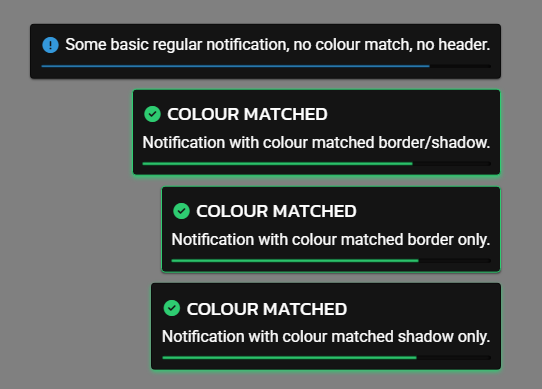
Shows floating notifications on the screen to alert the player.\
Use these for messages like success, errors, info, warnings, etc.\
\
These were added mainly to provide a built in way for notifying from within the UI, however you can use the notifications externally if you wish.
***
## Usage
You **trigger notifications** using component `notify` sections, directly though `exports.bduk:notify(opts)`, or by firing the client event `bduk:notify`
***
## Structure
```lua
{
type = "success",
message = "Item added to inventory!",
header = "Success",
icon = "fa-solid fa-check-circle",
duration = 5000,
match_border = true,
match_shadow = true
}
```
***
## Notification Options
* **`type`**: `"info"`, `"success"`, `"warning"`, or `"error"` — changes the color.
* **`header`** *(optional)*: Bold title at the top.
* **`message`**: Main text body.
* **`icon`** *(optional)*: Font Awesome icon class (e.g. `"fa-solid fa-check"`).
* **`duration`** *(optional)*: How long it stays on screen (in ms). `0` = sticky.
* **`match_border`** *(optional)*: Color the border to match the type.
* **`match_shadow`** *(optional)*: Color the shadow to match the type.
***
## Position & Direction
You can configure where and how notifications appear using within the main builder config:
notify = {
    position = "top-right",      -- top-left, top-center, bottom-right, etc.
    fill_direction = "down"      -- "down" (default) or "up"
}
If you don't specify this, it defaults to `"right-center"` filling **downward**.
***
#### Notes
* Notifications are **always floating** — they don’t go in layout slots.
* Supports multiple styles and customizable timing.
* Can stack multiple at once.